Step five · about 11 minutes
Set up a first game you can finish
The setup screens in order, the first turns, a first look at magic and how a game is won, on a small map you can finish.
Your first game is for finding out what the buttons do, and it goes better if the world is small. A game is created and played in two separate steps: you create it with Create World on the main menu, and afterwards you come back to it with Continue Old Game. This step goes through the creation screens in order, then the first turns, then a first look at magic, then how a game is won.
The screens before turn one
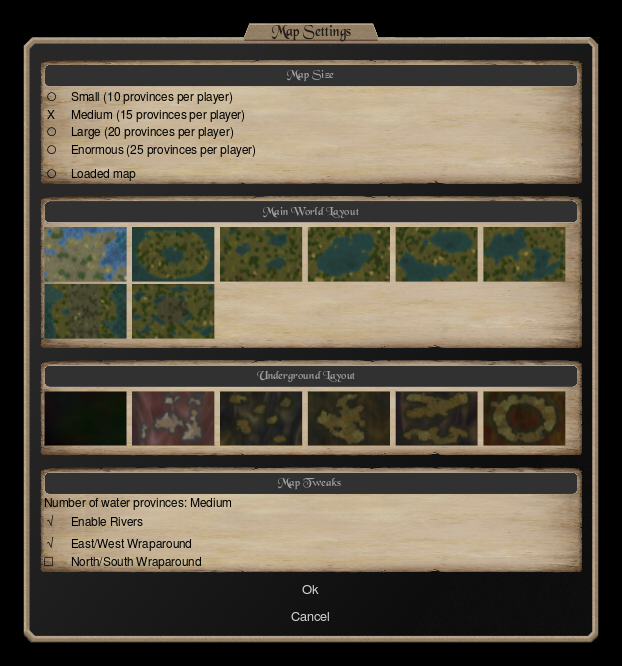
Everything in this part is chosen on the screens that follow Create World.
- Map size. The smallest size gives each player ten provincesprovince · One region of the map. It holds people, income, resources and your troops, and provinces are what players take from each other. Full article . A smaller map means shorter turns and earlier contact with your neighbours, which is when the game starts to teach you things. You can pick a ready-made map or have the game make one.
- Ageage · Early, Middle or Late. The age you pick decides which nations can be played. In general, Early Age nations have stronger mages and weaker troops. Full article . The Middle Age is selected by default, and it is a sensible place to start. The age decides which nations are on offer, and step four covers the choice.
- Your nationnation · The people your god leads: their troops, commanders, mages, sacred units, magic paths and history. Each nation is a different game. Full article . The default is Random, which picks from the list for that age. Click the word to open the list and choose one yourself.
Opponents and difficulty
Add players with the Add new player link, set each to a nation or leave it at Random, and click a nation’s name followed by None to remove it. Each computer opponent has a difficulty, and Easy AI is the lowest. Two or three of them are plenty: every extra nation makes each turn take longer.
The manual also describes a disciple game, a team format where one player is the pretender and the others play its disciples. That is for later, and nothing else in this guide needs it.
After the players, the game takes you to the pretender screen for each human, which is step two. You can save a god you like and load it again in later games.
Game settings: the World tab
The last screen is the game settingsgame settings · The options chosen when a game is created: the makeup of the world, the divine rules, and the victory conditions on the Thrones tab. Full article . The window has two tabs, World and Thrones, and every setting on it explains itself when you hover over it, so you can read each one in the game.
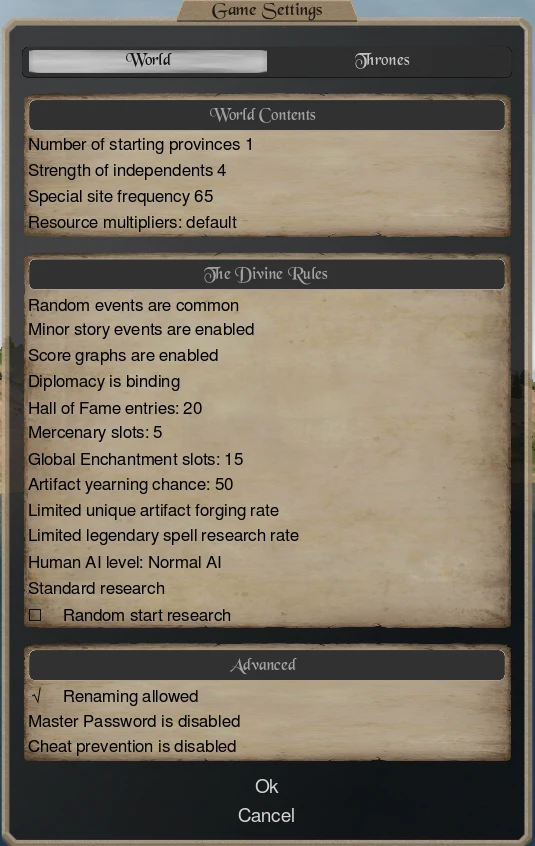
The World tab has three groups. World Contents sets the makeup of the map, for example how strong the independentsindependents · The neutral peoples who hold provinces nobody owns. You conquer them to expand, and a game setting decides how strong they are. Full article are, how often magic sites appear and how much gold and resources the world yields. The Divine Rules cover things such as random events, score graphs, how binding diplomacy is, mercenary slots, global enchantment slots and research rules. Advanced holds renaming, a master password and cheat prevention.
A few that are worth understanding:
- Strength of independents. A high setting slows everyone’s expansion while they build larger armies to take the neutral provinces, and it delays the moment you meet your neighbours.
- Magic sites and research. More of either hurts nations with weak magic, because nations that are already good at magic begin using strong spells sooner.
- Score graphs. They are on in the captured settings above. In multiplayer they can take over the game, because everyone watches who looks like the biggest threat. In a single-player game they are a useful way to see how you are doing.
- Limited unique artifact forging and limited legendary spell research. Both are on by default. The first allows one unique artifact to be forged per turn, and the second makes research level 9 a single choice of spell from those available at that level, which you can repeat to collect the rest.
- Renaming. Off by default. Turn it on to rename your commanders, except pretenders, disciples, prophets and famous heroes.
For a first game, leave the rest as they are.
Thrones and the victory rule
The Thrones tab sets how the game is won. A game has one of two victory conditions:
- Victory by Thrones of Ascension. The default, and the one the manual recommends. A Throne of AscensionThrone of Ascension · A special province worth 1, 2 or 3 ascension points. Holding enough of them wins the game under the default victory rule. Full article is a special province that pays out ascension pointsascension points · The score Thrones of Ascension give their holder. The game settings say how many a player must hold to win. Full article according to its level: 1, 2 or 3. The lowest level is barely tougher to capture than an ordinary province, while the highest is a serious fortress. Sliders let you decide how many thrones of each level the map holds and how many points one player must hold to be declared the true god.
- Conquer allConquer all · A victory setting where the game is won only by eliminating every other player, instead of by holding Thrones of Ascension. Full article . The game is won by eliminating every other player.
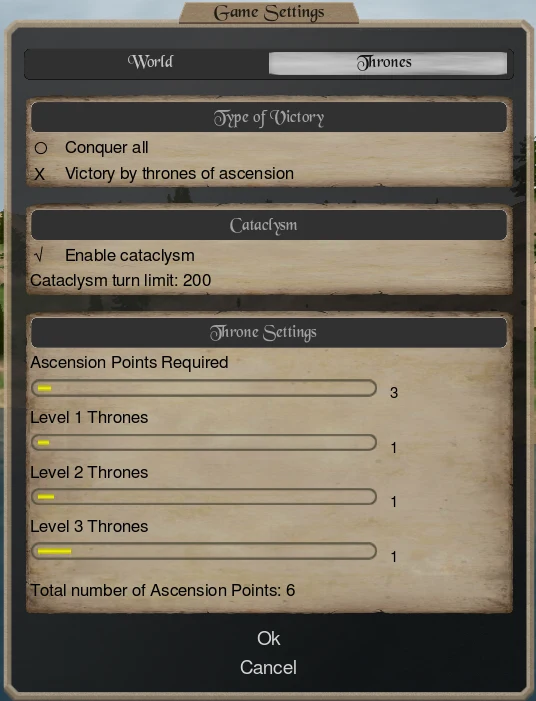
The map’s thrones only matter in the Thrones victory. A throne must be claimed before it counts: the Claim Throne of Ascension order is available to a pretender, a prophet or a level 3 priest in the throne’s province. A claimed throne also spreads your dominion as a temple does, with between one and seven temple checks depending on the throne, and its bless effects go to your blessed units, as step two describes.
Cataclysm
The CataclysmCataclysm · An optional setting that ends a game at a set turn. Horrors appear and destroy Thrones of Ascension, which lowers the points needed to win. Full article is a switch that puts a deadline on the game. Once the chosen turn arrives, monstrous horrors spawn and set about wrecking the Thrones of Ascension. Each throne they destroy also lowers the points needed to win, so somebody should cross the line soon afterwards, and if every throne falls while nobody holds one, the horrors are the winners.
You will find it on the Thrones tab, as a tick box with a turn limit beside it. Magic suffers too. While the Cataclysm lasts, the world’s magic is corrupted: a mage who casts a ritual, forges an item or empowers something may attract a horror, and the more gems the working used, the worse the horror can be.
For a first single-player game, untick it. The Cataclysm exists to end games on a schedule, which suits a multiplayer group with a deadline. In single-player you want time to find out what the game is, and a world where horrors are about to start tearing down the thrones, and where casting a ritual is dangerous, hurries a game that you wanted to learn slowly. Untick Enable cataclysm and the game goes on until someone wins by the rule you chose.
The turn timer
A single-player game works out the next turn as soon as you end yours, so you can play at your own pace. A hosted multiplayer game runs on a clock: the host chooses how long players have, and turns are commonly a day apart, as the home page says. Setting up hosting is outside this guide. Dominions 6 also has a Blitz mode for much shorter games; the wiki has not tested how it works yet, so the in-game description is the place to read about it.
Your first turns
When the game opens, the first thing to do is read the messages. Each turn begins with a list of what happened, and it can include proclamations, newly sensed provinces and battles. Then:
- Look at your commanders. You begin with a few, including your god if you chose an awake one. Each commandercommander · A unit that leads troops or does a job such as research, forging or preaching. Only commanders carry gems and change equipment. Full article can be given an order, such as moving, recruiting, researching, forging, searching for sites or preaching.
- Recruit. Your nation’s own troops are hired in provinces with a fort, and at the start only the capital has one. A unit costs goldgold cost · What a unit costs in gold to recruit. This wiki shows ? where the Inspector's value has not been checked in the game yet. Full article and resourcesresource cost · The equipment a unit needs. It is taken from the province's resources, which are not saved from one turn to the next, so a province with few resources cannot arm many heavy units. Full article , and recruitmentrecruitment points · How much of a province's recruitment capacity a unit uses. A province can train only so many of the better units in one turn. Full article points limit how many a province can produce in a turn. The strategy article calls these the walls, because when you cannot afford a unit it is one of them.
- Put your mages to work. A magemage · A commander with skill in one or more magic paths. Mages research, cast spells, forge items and search provinces for magic sites. Full article can be set to research, which is the long engine of the game. Magic basics below explains it.
- Scout and expand. Send a cheap commander into the next province to see what is there, which players call pingingpinging · The cheapest form of scouting, which is sending one cheap commander into a province to see what defends it, not to conquer it. Full article . Provinces held by the independentsindependents · The neutral peoples who hold provinces nobody owns. You conquer them to expand, and a game setting decides how strong they are. Full article are defended by their PDProvince defence · The garrison a province raises on its own when you invest gold in it. You do not control it directly, it is capped by the province's population, and it defends automatically. Full article , which you can beat by bringing a few troops and giving the army orders as in step three. Taking provinces adds incomeincome · The gold your provinces bring in each turn, which you spend on troops, commanders, buildings and mercenaries. Full article , resources and recruits, and the early game is a race to take them.
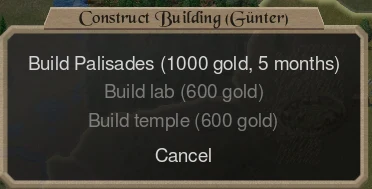
- Build. A fortfort · A building that protects a province, collects resources and opens the nation's special recruits there. Your capital starts with one. Full article protects a province and, in the strategy article’s words, makes it more productive and opens more of the nation’s units to recruit. A laboratorylaboratory · A building where your mages can research and forge. You build one in a province you hold. Full article lets mages research and forge, and a templetemple · A building that spreads your dominion and lets your priests preach and bless in that province. Full article lets priests preach, bless and spread your dominion.
- End the turn. Read the next turn’s messages, and watch the first battle replay with some care.
Two more tools help in the first dozen turns. Mercenariesmercenary · A soldier hired for gold. Mercenaries arrive at once and cost upkeep until you dismiss them. Full article are soldiers you rent for gold that arrive at once, a flexible way to plug a gap (the mercenaries page lists them). And a game’s score graphs show how you compare with the others, if they are enabled. For the reasons behind the order here, and the economics of forts and resources, the strategy article’s tempo and economy sections go further.
Magic basics
Magic is a long investment, not a button. Two things decide what a mage can cast, and both are needed:
- A magic pathmagic path · One kind of magic: Fire, Air, Water, Earth, Astral, Death, Nature, Glamour or Blood, plus Holy for priests. Skill in a path decides the spells a caster can use. Full article in the mage. There are ten: Fire, Air, Water, Earth, Astral, Death, Nature, Glamour, Blood and Holy. Your nation’s mages have fixed paths, and your god adds its own.
- Researchresearch · Points your mages produce each month towards the next level in a school of magic. Higher levels unlock stronger spells. Full article in the matching school. There are seven magic schoolsmagic school · One of the seven fields of spell research, such as Evocation or Construction. Each level researched unlocks stronger spells. Full article , listed on the schools page, and each has its own page: Alteration, Blood, Conjuration, Construction, Enchantment, Evocation and Thaumaturgy. Research builds up month by month from mages you set to study, and each level opens spells of rising power.
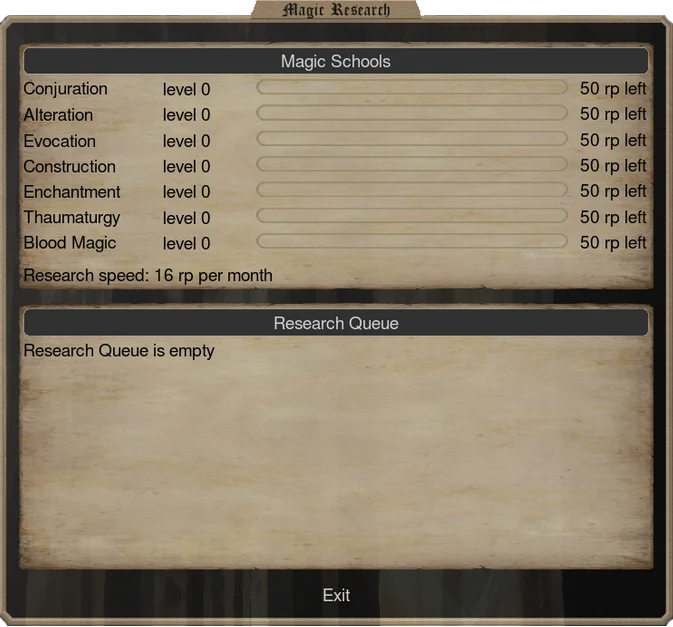
Then the mages do jobs on the map. They can cast spells in battle, from the orders you gave them in step three. They can cast ritualsritual · A spell cast on the map instead of in battle. Rituals change provinces or the world, and the stronger ones are paid for in gems. Full article , which are spells you cast on the map instead, to change provinces or the world. They can search a province for magic sites. A magic sitemagic site · A place in a province that can produce gems or let you recruit special units. Mages find them by searching the province. Full article can produce gemsgems · The currency of the stronger magic, produced by magic sites. Rituals, forging and some battle spells spend them. Full article , the currency that rituals, forging and the stronger battle spells spend. And they can forge a magic item, an order that also costs gems, which a commander then carries. Every mage has one job a turn: a mage who studies is not forging, and one who is casting a ritual is not in the army.
The wiki’s tables list all of it: the spells table with the path and school each spell needs, the magic items and the magic sites. A first example: Fires from Afar is a spell the strategy article says does almost no damage, but shows exactly which mages stand in a distant province.
How you win
Under the default rule, you win by holding enough ascension points. That means taking thrones, which are guarded more heavily the higher their level, and keeping them. Along the way your dominion matters twice: it makes your god and your sacred troops stronger where it is strong, and a god with no dominion left anywhere on the map is out of the game. If the Cataclysm is on, the clock is also running. If the game is set to Conquer all, winning means destroying every other pretender.
Then design your god, accept that it will be wrong, and play until you lose something that matters to you. That is the lesson the first game is for. Step six is for when you do not know what happened.
Terms on this page
Generated from the terms used above. This block is what prints.
- province
- One region of the map. It holds people, income, resources and your troops, and provinces are what players take from each other. · Full article · back to text
- age
- Early, Middle or Late. The age you pick decides which nations can be played. In general, Early Age nations have stronger mages and weaker troops. · Full article · back to text
- nation
- The people your god leads: their troops, commanders, mages, sacred units, magic paths and history. Each nation is a different game. · Full article · back to text
- game settings
- The options chosen when a game is created: the makeup of the world, the divine rules, and the victory conditions on the Thrones tab. · Full article · back to text
- independents
- The neutral peoples who hold provinces nobody owns. You conquer them to expand, and a game setting decides how strong they are. · Full article · back to text
- Throne of Ascension
- A special province worth 1, 2 or 3 ascension points. Holding enough of them wins the game under the default victory rule. · Full article · back to text
- ascension points
- The score Thrones of Ascension give their holder. The game settings say how many a player must hold to win. · Full article · back to text
- Conquer all
- A victory setting where the game is won only by eliminating every other player, instead of by holding Thrones of Ascension. · Full article · back to text
- Cataclysm
- An optional setting that ends a game at a set turn. Horrors appear and destroy Thrones of Ascension, which lowers the points needed to win. · Full article · back to text
- commander
- A unit that leads troops or does a job such as research, forging or preaching. Only commanders carry gems and change equipment. · Full article · back to text
- gold cost
- What a unit costs in gold to recruit. This wiki shows ? where the Inspector's value has not been checked in the game yet. · Full article · back to text
- resource cost
- The equipment a unit needs. It is taken from the province's resources, which are not saved from one turn to the next, so a province with few resources cannot arm many heavy units. · Full article · back to text
- recruitment points
- How much of a province's recruitment capacity a unit uses. A province can train only so many of the better units in one turn. · Full article · back to text
- mage
- A commander with skill in one or more magic paths. Mages research, cast spells, forge items and search provinces for magic sites. · Full article · back to text
- pinging
- The cheapest form of scouting, which is sending one cheap commander into a province to see what defends it, not to conquer it. · Full article · back to text
- PD
- The garrison a province raises on its own when you invest gold in it. You do not control it directly, it is capped by the province's population, and it defends automatically. · Full article · back to text
- income
- The gold your provinces bring in each turn, which you spend on troops, commanders, buildings and mercenaries. · Full article · back to text
- fort
- A building that protects a province, collects resources and opens the nation's special recruits there. Your capital starts with one. · Full article · back to text
- laboratory
- A building where your mages can research and forge. You build one in a province you hold. · Full article · back to text
- temple
- A building that spreads your dominion and lets your priests preach and bless in that province. · Full article · back to text
- mercenary
- A soldier hired for gold. Mercenaries arrive at once and cost upkeep until you dismiss them. · Full article · back to text
- magic path
- One kind of magic: Fire, Air, Water, Earth, Astral, Death, Nature, Glamour or Blood, plus Holy for priests. Skill in a path decides the spells a caster can use. · Full article · back to text
- research
- Points your mages produce each month towards the next level in a school of magic. Higher levels unlock stronger spells. · Full article · back to text
- magic school
- One of the seven fields of spell research, such as Evocation or Construction. Each level researched unlocks stronger spells. · Full article · back to text
- ritual
- A spell cast on the map instead of in battle. Rituals change provinces or the world, and the stronger ones are paid for in gems. · Full article · back to text
- magic site
- A place in a province that can produce gems or let you recruit special units. Mages find them by searching the province. · Full article · back to text
- gems
- The currency of the stronger magic, produced by magic sites. Rituals, forging and some battle spells spend them. · Full article · back to text
Not sure this is your kind of game? That's a reasonable conclusion — here is what it is and isn't.